字體:小 中 大
 |
|
|
|
| 2020/07/23 13:55:59瀏覽26|回應0|推薦0 | |
Error: It prompts “Device fault20” on Lonsdor K518 programmer.
Solution: Step 1: Hold those two buttons marked in red at the same time
Then you will enter the Update interface as below
Step 2: Press “Uninstall APK” once, and you will get the prompt as below
Step 3: Press “OK” and you will enter the Update interface again.
Step 4: Press “Oldest APK” once and you will see loading interface
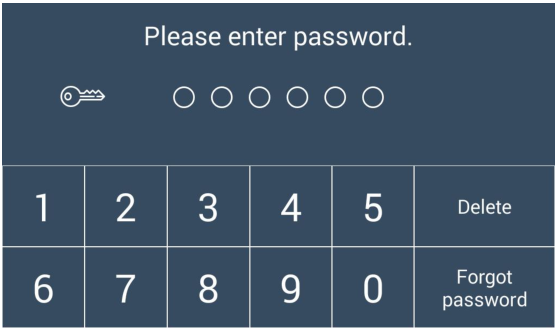
Step 5: Enter the password
Step 6: Connect the device to WiFi and then press “Update”
Step 7: Press “OK” to update the device
When finish the steps above, the K518 key programmer will be normal as before after updating. Note: this solution is also suitable for the following common problems: Problem 1: Cannot enter the main interface of K518 device Problem 2: It takes much time to enter the main menu of K518 Problem 3: Some menus are lost in the K518 device Tech support: www.obdiitool.co.uk Source: http://blog.obdiitool.co.uk/solve-lonsdor-k518-device-fault20-error/ |
|
| ( 不分類|不分類 ) |