字體:小 中 大
 |
|
|
|
| 2012/11/21 15:11:17瀏覽350|回應0|推薦0 | |
It will introduce how to pair with combo sensor , heart rate monitor, power meter and calibrating the power meter. You can also download the English user manual. If you just want to manually set up E5 cycling computer, you can refer to the English user manual from page 30 to page 35 HRM ( heart rate monitor) -------------------------------------------------------------------------------------------------- The HRM menu allows you to monitor your exercise and body condition. The Heart Rate Monitor (HRM) is attached to an elastic band worn around the chest. This section describes how to pair and wear the heart rate monitor . Pairing connects the Heart Rate Monitor to your Xplova E5, allowing heart rate to be recorded and displayed on screen Press long = Press the button for 2 seconds and then release the button
1) A popup on the Xplova E5 indicates when the HRM is paired.
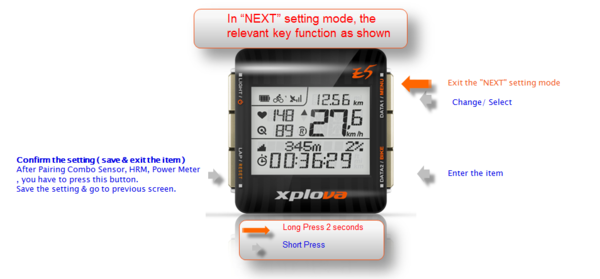
2) While E5 successfully paired successfully with a heart rate monitor (HRM), After HRM complete to pair with E5, you have to short press the button “LAP/RESET” twice. Confirm to save the pairing information and return to the previous screen.
3) If you want to know more clearly, you can refer to the following pairing videos.
4)Wearing the Heart Rate Monitor After pairing, wear the heart rate monitor around your chest as close as possible to the heart with the monitor segment worn in the middle of the chest 4.1) Unbuckle the strap.
4.2) Wrap the strap around your chest and re-buckle it.
4.3) Adjust the circumference of the band to fit.
|
|
| ( 興趣嗜好|運動 ) |