字體:小 中 大
 |
|
|
|
| 2017/12/15 18:45:26瀏覽248|回應0|推薦0 | |
Yesterday, I completed the project that updating Mercedes-Benz Smart 451 gearbox firmware with MB SD connect compact 4 successfully. This blog is for sharing the steps. Hope it will be helpful. MB SDConnect C4 Features 1. New MB SD Connect Compact 4 Star Diagnosis support wireless diagnose;
Connect SD C4 with smart 451 and the laptop. Open DAS and click the down arrows.
Select “manual vehicle identification”.
Select “smart fortwo (C/A451)”.
Select “restof the world”, then tick.
Select “smart fortwo 45-kW gasoline engine”
Then “Left-hand steering” and tick.
Let the MB SD Connect C4 special or standard equipment be determined from the control unit “N10/10 (SAM control unit)” automatically.
DAS is initializing communication layer.
Communication is being established.
Select systems.
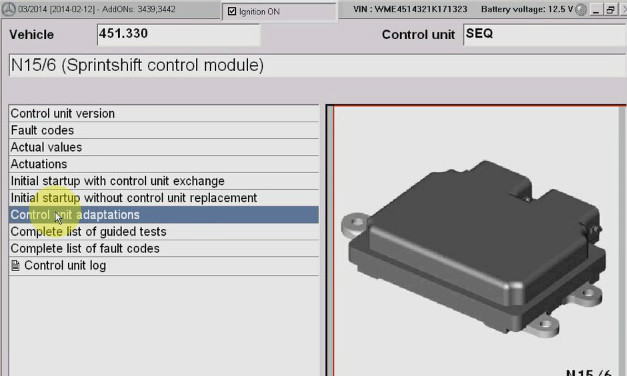
Select “ N15/6 (Sprint shift control module)”.
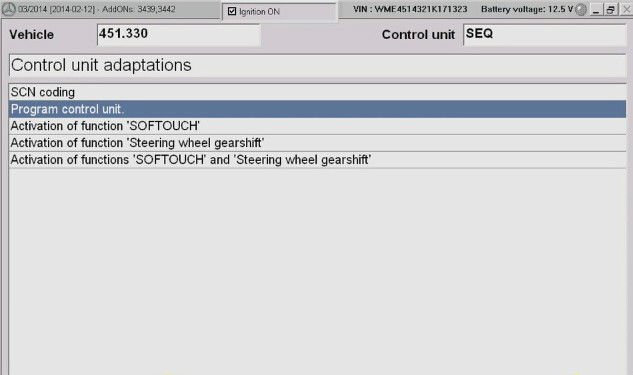
Select “ Control unit adaptations”.
The special equipment “SOFTOUCH” fitted to the vehicle.
Program Control Unit, tick.
Select “offline(diagnostic scn coding)”. Notice: For this option must have developed mode in DAS and activated “mbetried tool” for offline programming. Click tick mark.
Put the flash DVD on CD-ROM and click F2.
The VeDoc data for model series 451 are not available. SDConnect C4 Click F2 to continue.
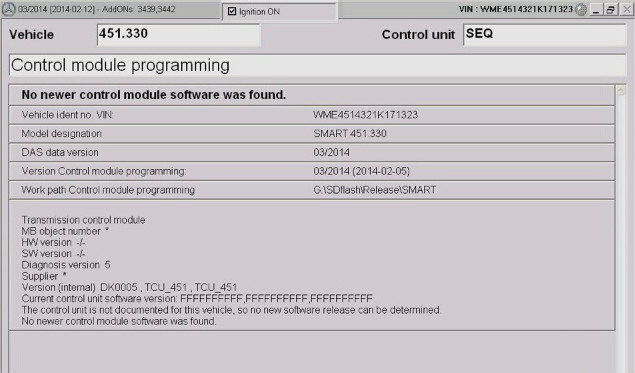
No newer control module software was found.
Follow these steps, you will find your problem is so easy to solve. http://www.fobdii.com/wholesale-79-mb-sd-connect-compact-4-star-diagnosis-tool-with-wifi.html |
|
| ( 不分類|不分類 ) |