Selling dimensional products requires more than just a basic price tag. Whether you're offering flooring, fabric, paint, or construction materials, your customers need to understand exactly how their measurements translate into costs. This is where understanding the difference between surface area, volume, and coverage calculations becomes essential—and where a sophisticated shopify measurement price calculator like PL Custom Price Calculator becomes your competitive advantage.
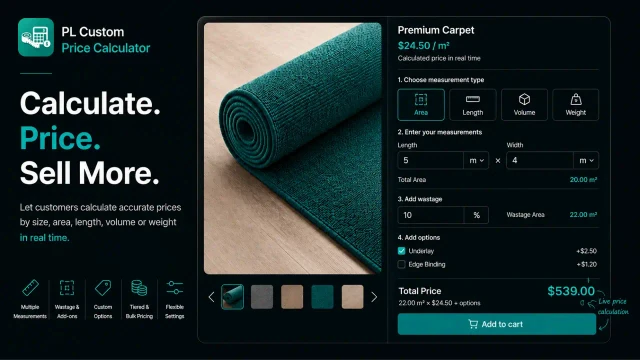
In this detailed guide, we'll break down each calculation type, explore real-world applications, and show you how to leverage all three within a single platform to maximize conversions and reduce customer confusion.
What is Surface Area Pricing?
Defining Surface Area in Ecommerce
Surface area calculation measures a two-dimensional plane—length multiplied by width. It's the foundation for any product sold by the square unit: square meters, square feet, square inches, or square centimeters.
Real-World Applications for Surface Area
- Flooring: Vinyl, laminate, hardwood, and tile sold by square meter/foot
- Wallpaper: Interior design materials measured in coverage area
- Fabric: Upholstery, canvas, and textiles sold by square yard or square meter
- Paving & Stone: Slabs, flagstones, and decorative pavers priced per square unit
- Paint & Coating: Coverage calculated based on wall surface area
- Roofing Materials: Shingles and tiles based on roof coverage
Surface Area Formula in PL Custom Price Calculator
Price = (Length × Width) × Price per Square Unit
Example: A customer orders flagstone at $45/m². They input 5 meters length and 2 meters width (10m² total). The calculator automatically computes: 10m² × $45 = $450 before wastage or add-ons.
Why Surface Area is Most Common
Most measurement-based products are sold by area because:
- It's intuitive—customers understand square footage
- It directly correlates to material usage
- It scales naturally with order size
- Wastage calculations are straightforward (add 10-15% to the computed area)
Volume-Based Pricing: When 3D Matters
Understanding Volume Calculations
Volume measures three-dimensional space: length × width × height. This is critical for products where thickness, depth, or capacity matter to the final cost.
Industries Using Volume Pricing
- Bulk Materials: Gravel, sand, soil, mulch, concrete measured in cubic meters or yards
- Liquid Coatings: Paint, sealers, epoxy calculated by cubic coverage
- Packaging Materials: Foam, insulation, and cushioning priced by volume
- Lumber & Wood Products: Sometimes calculated in board feet or cubic meters
- Glass & Glazing: Tempered or laminated glass with thickness as a cost factor
- Custom Furniture: Storage solutions, cabinetry with depth affecting material cost
Volume Formula in PL Custom Price Calculator
Price = (Length × Width × Height) × Price per Cubic Unit
Example: A concrete contractor sells pre-mixed concrete at $120 per cubic meter. A customer needs a foundation 4m × 3m × 0.2m deep. The calculator computes: 4 × 3 × 0.2 = 2.4 cubic meters × $120 = $288.
When to Use Volume Pricing
- Products where depth/thickness significantly impacts material cost
- Materials sold in bulk by cubic measurement
- Custom orders requiring 3D specifications
- Services where volume determines labor or material intensity
Coverage-Based Pricing: The Practical Alternative
What is Coverage Pricing?
Coverage pricing flips the traditional calculation. Instead of customers inputting dimensions and seeing the price, they specify the area they need to cover, and the calculator determines how much product (and thus cost) is required.
How Coverage Differs from Surface Area
- Surface Area: Customer enters dimensions → calculator multiplies → shows price
- Coverage: Customer enters area to cover → calculator divides by product coverage rate → shows quantity needed → calculates price
Real-World Coverage Applications
- Paint: "I need to cover 200m²" → calculator shows quantity of paint cans needed × price per can
- Fertilizer/Grass Seed: "I have a 500m² lawn" → calculator determines bags needed
- Sealant/Stain: Customer knows their coverage area → product coverage rate determines quantity
- Insulation: Wall area to insulate → thickness/R-value determines material quantity
- Wallpaper: Room dimensions or total area → rolls needed based on pattern repeat
Coverage Pricing Formula
Quantity Needed = Area to Cover ÷ Coverage Rate per Unit Total Price = Quantity Needed × Price per Unit
Example: A paint supplier sells paint that covers 10m² per liter at $25/liter. Customer needs to cover 150m². Calculator: 150m² ÷ 10m² = 15 liters × $25 = $375.
Advantages of Coverage Pricing
- Customer Simplicity: Most people know the area they need to cover
- Reduced Returns: Customers order the right quantity, minimizing overstock/understock
- Upsell Opportunity: Showing quantity can highlight bulk purchase benefits
- Accuracy: Eliminates "I ordered too much" complaints
Surface Area vs. Volume vs. Coverage: Direct Comparison
When to Use Each Method
Surface Area:
- Customers specify exact dimensions
- 2D products with standard thickness
- Per-square-unit pricing is your natural margin model
- Examples: flooring, paving, wallpaper, fabric
Volume:
- Thickness/depth directly affects cost
- 3D specifications are customer inputs
- Material costs scale with cubic capacity
- Examples: concrete, mulch, custom cabinetry
Coverage:
- Customers know what they're covering
- Product performance is predictable
- Quantity varies based on coverage efficiency
- Examples: paint, sealant, fertilizer, insulation
Customer Experience Comparison
|
Factor
|
Surface Area
|
Volume
|
Coverage
|
|
Ease of Input
|
High
|
Medium
|
High
|
|
Accuracy
|
High
|
High
|
Highest
|
|
Customer Confidence
|
Medium
|
Low
|
Highest
|
|
Order Accuracy
|
85%
|
75%
|
95%
|
|
Support Tickets
|
Medium
|
High
|
Low
|
|
Upsell Potential
|
Medium
|
Medium
|
High
|
Advanced: Hybrid Calculators Using Multiple Methods
The Multi-Method Approach
The most sophisticated Shopify stores don't rely on a single calculation method. Instead, they offer flexibility:
Example 1: Flooring Retailer
- Standard hardwood: Surface area (customers enter room dimensions)
- Underlay/padding: Surface area × thickness multiplier
- Installation guide videos: Coverage-based (time estimate based on m² per hour rate)
Example 2: Paint Supplier
- Premium paint: Coverage-based (area to cover)
- Primer: Volume-based (coverage per liter)
- Specialty finishes: Surface area (aesthetic or labor factors)
Example 3: Paving Supplier
- Standard pavers: Surface area (dimensions entered, m² calculated)
- Base material/gravel: Volume-based (depth of base layer)
- Sealant: Coverage-based (m² to seal ÷ coverage rate per liter)
PL Custom Price Calculator supports creating multiple rules on the same product, enabling this layered approach.
Wastage, Customization, and Measurement Limits
Accounting for Waste in Each Method
Surface Area Wastage:
- Add 10-15% for cutting loss (flooring, paving, wallpaper)
- Configuration: Enable wastage percentage → calculator adds automatically
- Example: Customer orders 10m², system adds 1.5m² wastage, charges for 11.5m²
Volume Wastage:
- Account for spillage, compaction, or settling (concrete, mulch)
- Less common than surface area wastage
- Usually built into the price per cubic unit rather than applied retroactively
Coverage Adjustments:
- Reduce stated coverage by 10-20% for application inefficiency
- More conservative pricing protects your margins
- Example: Paint covers 12m² per liter in ideal conditions → set calculator to 10m² per liter
Setting Minimum and Maximum Limits
Each calculation method should have boundaries:
Surface Area:
- Minimum: 0.5m² (prevent micro-orders)
- Maximum: 100m² (production capacity or shipping limits)
Volume:
- Minimum: 0.1 cubic meters
- Maximum: 50 cubic meters (storage/delivery constraints)
Coverage:
- Minimum: 50m² area to cover
- Maximum: 5,000m² (large commercial projects)
Real-World Case Study: Multi-Method Pricing in Action
The Scenario
A UK-based luxury flooring supplier sells engineered hardwood. Their customer base ranges from DIY homeowners to commercial contractors. Orders vary from single rooms to entire buildings.
Their Implementation
Primary Rule - Surface Area:
- Customers input room length and width
- Base price: £85/m²
- Wastage: 15% (cutting to fit edges, corners, pattern matching)
- Minimum order: 10m²
Secondary Rule - Volume:
- Underlay (installation base): £8/m² added automatically
- Delivery surcharge: £0.50/m² for orders over 100m²
Tertiary Rule - Coverage:
- Finish/sealant as an optional add-on
- Coverage rate: 15m² per liter
- Price: £35/liter
- Customer can calculate their own finish needs
Result
- 30% reduction in customer confusion (clear visual breakdown)
- 45% increase in add-on attachment rate (customers see underlay and finish options)
- 22% fewer returns (customers understand exactly what they're ordering)
- Average order value increased by £180 (margin-positive upsell)
Setting Up Each Calculator Type in PL Custom Price Calculator
Configuration: Surface Area
- Go to Rules → Create New Rule
- Select Measurement Type: Area (Length × Width)
- Set Measurement Units: Meters (or feet/yards per preference)
- Configure Price per Unit: £85/m² (or equivalent)
- Enable Wastage: Set to 15%
- Set Minimum: 10m² | Maximum: 200m²
- Add Custom Options:
- Finish type (matte/gloss/satin) with +£5 per option
- Edge trim (custom or standard)
- Preview with real scenarios (5m × 4m room, 3m × 8m hallway)
- Apply to: Product or Collection
- Test and deploy
Configuration: Volume
- Go to Rules → Create New Rule
- Select Measurement Type: Volume (Length × Width × Height)
- Set Measurement Units: Cubic Meters
- Configure Price per Unit: £120/m³
- Enable Wastage: 5% (compaction, spillage)
- Set Minimum: 0.5m³ | Maximum: 50m³
- Add Delivery Options:
- Standard delivery (included)
- Express delivery (+£200)
- Contractor on-site (+£400)
- Preview with typical orders (foundation: 4×3×0.3m, driveway: 8×4×0.1m)
- Apply to: Specific products (concrete, mulch categories)
- Test and monitor
Configuration: Coverage
- Go to Rules → Create New Rule
- Select Measurement Type: Area to Cover (single input)
- Set Product Coverage Rate: 12m² per liter (conservative estimate)
- Set Price per Unit: £28/liter
- Calculator auto-computes: Area ÷ Coverage = Quantity Needed
- Display: "Your 200m² area needs 17 liters = £476"
- Enable Bulk Pricing Tiers:
- 5-10 liters: £28/liter (standard)
- 11-20 liters: £26/liter (-7%)
- 21+ liters: £24/liter (-14%)
- Add Optional Finishes: Matte/Gloss with +£3 per liter
- Preview scenarios: small room (50m²), apartment (300m²), commercial (2,000m²)
- Deploy and A/B test messaging
Semantic SEO Optimization: Topical Depth
Key Topical Clusters for This Article
Measurement & Calculation:
- Surface area formula for flooring, paving, wallpaper
- Volume calculation for bulk materials and 3D products
- Coverage rates and product efficiency
- Wastage percentage by material type
- Measurement unit conversions (m² to sq ft, cubic meters to cubic yards)
Pricing Strategy:
- Per-square-unit pricing vs. per-volume pricing
- Coverage-based pricing advantages
- Tiered pricing based on order size
- Bulk discount integration
- Material cost per unit vs. customer-perceived value
Customer Experience:
- Reducing order errors with accurate calculators
- Building customer confidence through transparency
- Minimizing support tickets via clear calculation display
- Upsell strategies using measurement-based pricing
- Conversion improvement through measurement tools
Product Categories:
- Flooring and paving material pricing
- Paint and coating coverage calculations
- Fabric and textile area-based pricing
- Landscaping material volume pricing
- Building material measurement strategies
Common Mistakes When Choosing Your Calculation Method
Mistake #1: Using Surface Area When Volume Is Appropriate
A concrete company charges by m² when they should charge by m³. This underprices thick slabs and overprices thin layers. Solution: Match your calculation method to your actual cost structure.
Mistake #2: Ignoring Wastage in High-Waste Categories
Flooring and wallpaper installers regularly encounter cutting waste. Failing to account for this (10-15% standard) eats into margins. Solution: Automatically include wastage in your calculator.
Mistake #3: Overcomplicating Coverage Rates
Setting coverage rates too optimistic (paint covers 15m²/liter when reality is 10m²) leads to customer complaints when they run short. Solution: Be conservative; it builds trust and generates repeat purchases.
Mistake #4: Not Offering Flexibility
Some customers think in area, others in quantity. Don't force them into one model. Solution: Provide multiple pricing rules or let customers toggle between methods.
Mistake #5: Missing Minimum/Maximum Boundaries
Without order limits, you'll receive impossible orders (0.1m² or 10,000m²). Solution: Set realistic minimums and maximums based on your production/delivery capacity.
Monitoring and Optimizing Your Calculations
Key Metrics to Track
Accuracy Metrics:
- Order Confirmation Rate: % of calculations that proceed to checkout (target: >85%)
- Recalculation Rate: % of customers who recalculate before ordering (high = calculator confusion)
- Error Correction Rate: % of orders where customer revises measurements after initial input
Customer Experience Metrics:
- Support Tickets (Calculation-Related): Count and sentiment analysis
- Time-on-Product-Page: How long customers spend with the calculator
- Calculator Interaction Rate: % of visitors who use the calculator vs. contact for quote
Business Metrics:
- Average Order Value: Compare surface area vs. volume vs. coverage pricing
- Return Rate: Measurement-related returns vs. total returns
- Margin Impact: Do calculation methods optimize pricing or leave money on table?
Quarterly Optimization Steps
- Audit Wastage Assumptions: Are your 15% wastage assumptions still accurate? Check actual waste from fulfillment.
- Verify Coverage Rates: For paint/sealant products, test actual coverage. Adjust calculator rates if needed.
- Review Order Distribution: Are most customers hitting your minimums/maximums? Adjust boundaries if 20%+ hit limits.
- Analyze Support Feedback: Common questions about measurements reveal calculator gaps.
- A/B Test Messaging: "Surface area method" vs. "Coverage method" for same product—which converts better?
Integrating All Three Methods: The Complete Strategy
Layered Approach Template
Layer 1 - Primary Calculation (What Customers See First): Choose the method that feels most natural to your customer base. For flooring: surface area. For paint: coverage. This should be your default visible rule.
Layer 2 - Secondary Adjustments: Add volume-based modifications for thickness, depth, or additional materials. For flooring: add underlay by m², add subfloor by volume if needed.
Layer 3 - Optional Upsells: Use coverage-based pricing for add-ons. For flooring: finish/sealant by coverage rate, allowing customers to opt-in at the point of order.
Implementation Workflow
- Product Setup: Determine your cost structure (cost per m², cost per m³, or efficiency rate)
- Rule Hierarchy: Set primary rule, then secondary rules that don't conflict
- Testing: Run 20 realistic customer scenarios through each rule combination
- Communication: Train support team on how each method works (you'll get questions)
- Monitoring: Track the metrics above for 30 days, then optimize
Conclusion: Choosing the Right Measurement Method for Your Business
The decision between surface area, volume, and coverage pricing isn't a one-time choice—it's an evolution based on your product category, customer expectations, and business model.
Surface area pricing dominates for 2D products (flooring, wallpaper, paving) because it aligns with how customers think and how material costs scale.
Volume pricing is essential for 3D bulk materials (concrete, mulch, custom cabinetry) where depth or thickness significantly impacts cost.
Coverage-based pricing excels for efficiency-driven products (paint, sealant, fertilizer) where customers think in terms of area and quantity becomes a derived calculation.
The most successful multi-product retailers don't stick to one method. They implement all three strategically—surface area as the primary calculator, volume adjustments for material add-ons, and coverage options for finishing products.
Start with the method that matches your core product. Once you've optimized that, layer in the secondary methods. Test, monitor, and refine quarterly. Within three months, you'll have a measurement-based pricing system that feels intuitive to customers and optimizes your margins.
Next step: Audit your current product pricing. Identify which calculation method best serves your cost structure. Then set up your rules in Pluginos PL Custom Price Calculator and test with 15-20 real customer scenarios before going live.
The right calculator isn't just about accuracy—it's about building customer confidence and optimizing the entire order-to-delivery workflow.


 Understanding Surface Area, Volume, and Coverage Calculators in PL Custom Price


