字體:小 中 大
 |
|
|
|
| 2012/11/21 12:55:41瀏覽382|回應0|推薦0 | |
1) ABC I recommend using Google Chrome browser . How to get Google Chrome browser ? You can use Google to search the “Google Chrome”. You use the Chrome browser to read tour.xplova.com cloud web, After you download the browser to your computer, install the Chrome browser. Or you can try to download it from below website 2) Use Chrome browser to Open tour.xplova.com 3) After entering tour.xplova.com, please choose UK/English
3.1)This page becomes the English version
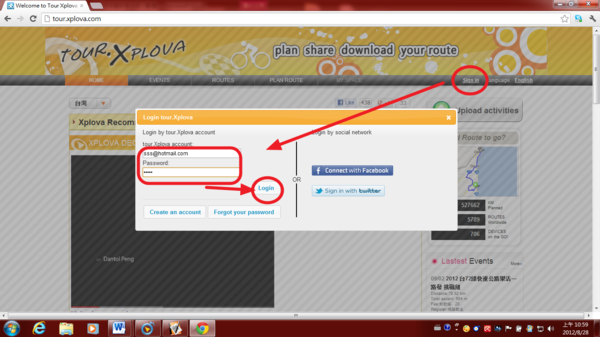
4) Sign in: User can sign in via facebook ID account or Twitter ID account or new E-mail ID account to enter tour.xplova.com cloud website..
4.1.1)Select a new E-mail ID Account to Sign in the cloud website, tour.xplova.com
4.1.2)After filling in E-mail ID account, choose " Create "
After you registered well, go to your Email-box, and collect the consent letter from the cloud server, and then select to " link " finishing registering. 4.1.3)Then use your E-mail ID account to sign in, you can become Legal member and use all functions in tour.xplova.com
4.1.4)After you sign in tour.xplova.com successfully, Your name will present herein. You can begin to use the webpage platform.
4.1.5)If you use facebook ID account or Twitter ID account to sign in , it will be easier to use E-mail ID account to sign in the clouds webpage. 4.2)Choose to sign in via facebook ID account
4.2.1)After you sign in tour.xplova.com successfully, Your name will present herein. You can begin to use the webpage platform.
4.3) Choose to sign in via Twitter ID account
4.3.1)After you sign in tour.xplova.com successfully, Your name will present herein. You can begin to use the webpage platform.
|
|
| ( 興趣嗜好|運動 ) |